Control Panel - Find WorldPay Account ID
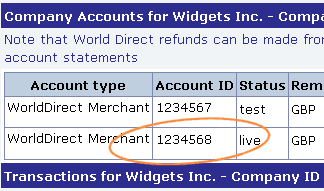
You should have at least two Account IDs, one test and one live. You need to enter the live account number into FastCart, even if you are only testing your site.
WorldPay Account ID
If you switch between full authorisation and pre-authorisation, or if you switch from WorldDirect to BankDirect (or vice versa), additional account IDs may be added to your account. If this happens, you will need to change the account ID used in FastCart and test your FastCart account to make sure it works properly with your WorldPay account.
To find your WorldPay account ID, log into your WorldPay account with the username and password given to you by WorldPay. Scroll down the page and you should see your account ID as per the image below:
If you have recently applied for a WorldPay account, you may not yet have login details for your WorldPay account. You can still set up your site and test it with FastCart while you wait for WorldPay to approve your application and send your login details to you.